The table is on the ticket
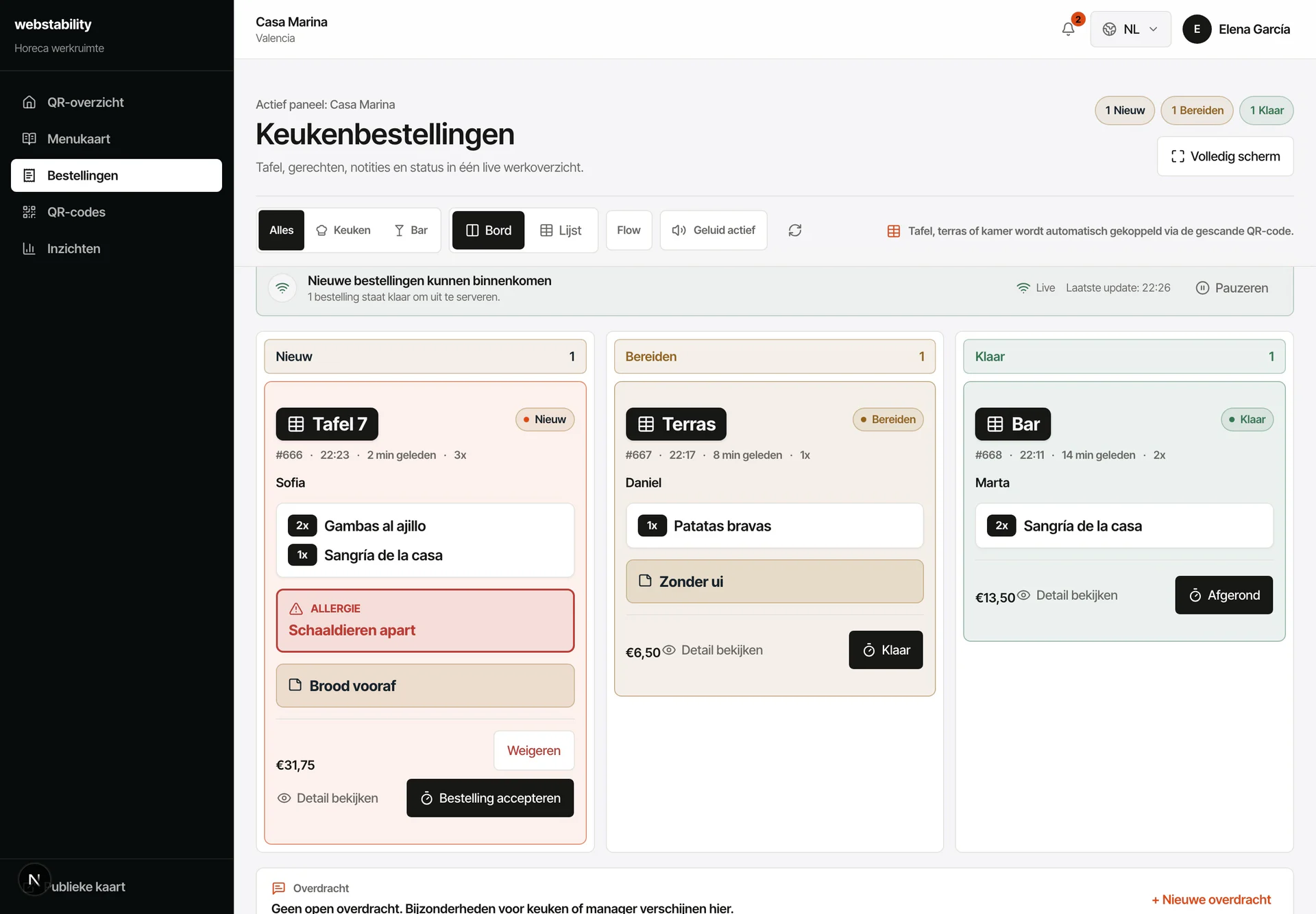
The order arrives as Table 12, Terrace or Bar; nobody has to ask whose it is.
QR table ordering
Your guest scans the QR on their table, reads the menu in their own language and orders from their phone. The order lands on the kitchen screen with the right table attached, without anyone shouting it across the room or scribbling it on a pad. And no commission per order: there is no percentage sitting between your kitchen and your guest. Table ordering and the kitchen screen are included in the Pro plan, €79 a month excl. VAT.

For the working day
Fewer trips across the floor per round: the guest orders from their table and the ticket appears in the kitchen with the table, the time and what was ordered. Nobody deciphers a handwritten note or asks whose main course this was. And when something runs out, you mark it sold out once and 240 ms later it can no longer be ordered from any table.
 Ordering and kitchen, inside the Pro plan
From menu to live
Create your tables and zones and generate a QR for each one.
Check dishes, prices and the 14 allergens before you publish the menu.
Place a test order from a table QR and watch it arrive in the kitchen.
Open for service: mark items sold out and change prices while you work.
What your team controls
During service there are only two questions: which table ordered, and what still has to go out. The same screen answers both. And you do not pay extra for it: buying a separate table-ordering system with a kitchen screen costs between €99 and €199 a month on the Spanish market, according to public rates for that kind of software checked in August 2026. Here it comes with the menu, the stock and the six languages in the same plan, and one person runs all of it from their own panel.
The order arrives as Table 12, Terrace or Bar; nobody has to ask whose it is.
Orders appear, go into preparation and get closed off, with no paper in between.
Your guest is already sitting in your dining room: the whole amount stays with you.
FAQ
No. Table ordering is part of the plan: no percentage per ticket and no middleman between your kitchen and your guest. What is ordered in your dining room is charged in your dining room, in full.
The order with its table or zone, the time, the dishes and the guest notes, on a kitchen screen. You start it and close it when the food goes out, with no handwritten tickets.
The Pro plan, €79 a month excl. VAT, together with the kitchen screen, stock and QR codes per table or zone. You already work with those features during the 30-day trial, with no card.
Leave ordering switched off and use the QR menu on its own. When you want to try it, you switch ordering on per table or per zone without touching a single engraved QR.
Webstability
Upload, review and publish it yourself. Your team then keeps dishes, languages and availability current.
Try 30 days free